
Description
The Responsive Filter Gallery plugin makes it simple to create beautiful, organized image displays on your WordPress site. Whether you need a professional portfolio showcase, a product catalog, or a creative photography album, this tool lets you sort content dynamically without page reloads.
Check Free Version Demo: Filter Gallery
Check Pro Version Demo: Filter Gallery Pro
More About Pro: Filter Gallery Pro Features
Where To Buy: Buy Filter Gallery Pro
Video Tutorials
We designed this plugin to be intuitive and lightweight. You can upload images, assign them to categories (filters), and let your visitors browse your work seamlessly. The gallery automatically adapts to desktops, tablets, and mobile screens, ensuring a perfect viewing experience everywhere.
Key Features
- Responsive Design: Automatically adapts to any screen size.
- Filterable Categories: meaningful tags to organize your projects or products.
- Bootstrap Integrated: Built on the solid foundation of Bootstrap for reliability.
- Easy Management: Simple drag-and-drop interface for ordering images.
- Unlimited Galleries: Create as many distinctive galleries as you need.
- Lightbox Support: Includes a built-in lightbox for viewing full-size images.
- Shortcode System: precise placement of galleries anywhere on your site.
Pro Version Features
Unlock the full potential of your portfolios with the Pro Version:
- Unlimited Filters: Create deep folder structures with parent and child filters.
- Advanced Layouts: Choose from Masonry, multi-column (2, 3, 4), and more.
- Custom Styling: Full control over colors for buttons, titles, and active states.
- SEO Optimization: Add “Alt” text to images for better search engine visibility.
- External Linking: Link gallery images to custom URLs.
- Hover Effects: Choose from multiple distinct hover animations.
- Premium Support: Get priority assistance for any questions.
Screenshots

Sports Gallery Preview 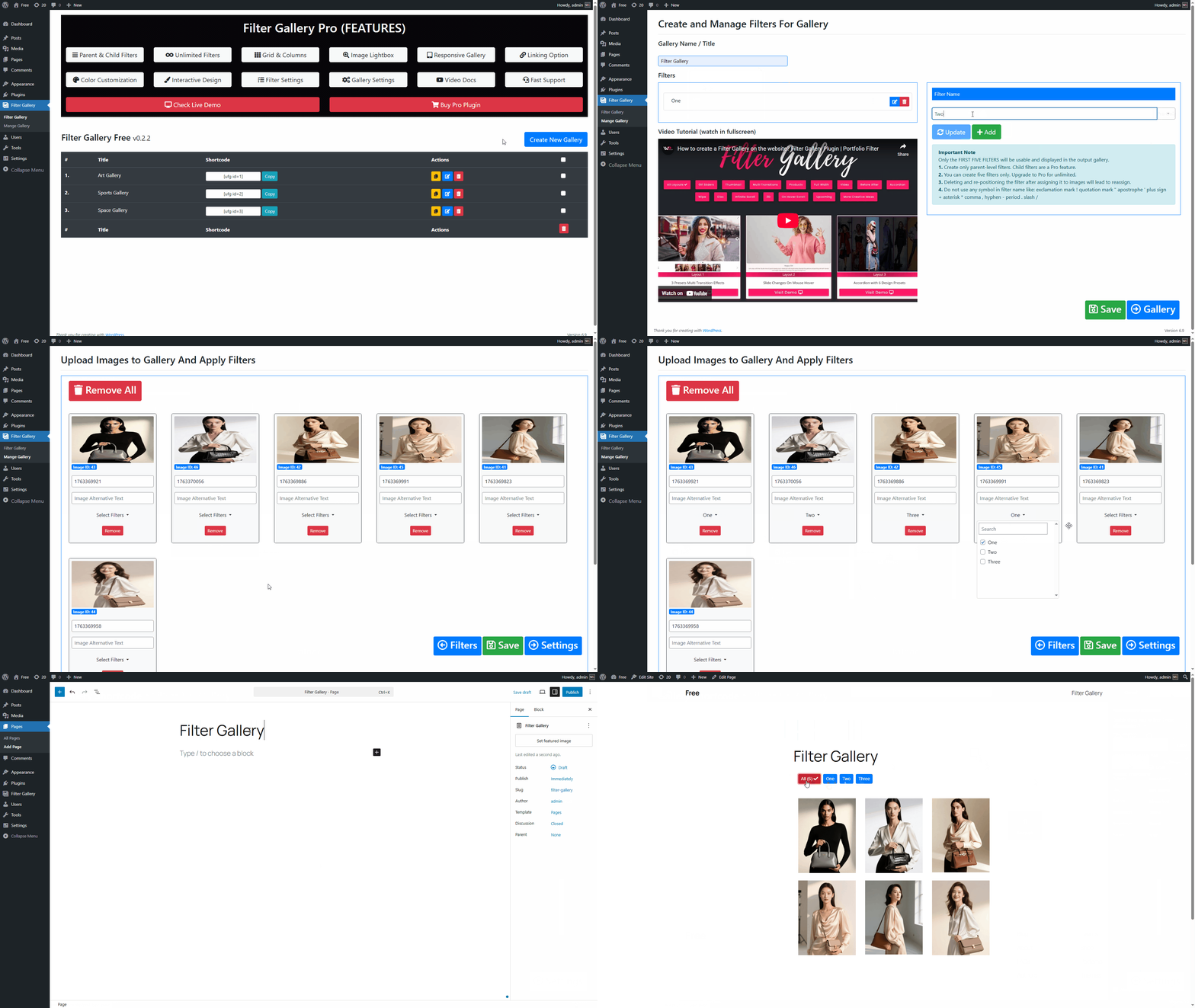
How to create a filter gallery?**
Installation
- Upload the
filter-galleryfolder to the/wp-content/plugins/directory. - Activate the plugin through the ‘Plugins’ menu in WordPress.
- Navigate to the “Filter Gallery” menu to create your first gallery.
- Add filters (categories) and upload your images.
- Copy the generated shortcode and paste it into any Post or Page.
FAQ
-
How do I create a new filter?
-
Go to the gallery edit page. You will see a “Filters” section where you can add new filter names. Once added, you can assign these filters to your uploaded images.
-
Is the gallery responsive?
-
Yes, the gallery grid is fully responsive and will adjust the number of columns based on the viewing device (mobile, tablet, or desktop).
-
Can I link images to other pages?
-
In the free version, images open in a lightbox. The Pro version allows you to link images to custom external or internal URLs.
-
Does this modify my theme files?
-
No, this plugin works independently of your theme. It uses its own styles and scripts which are loaded only when the shortcode is used.
-
Can I place multiple galleries on one page?
-
No, you can add only one gallery to a single page or post.
-
Does this plugin work with page builders like Elementor, Divi, or Beaver Builder?
-
Absolutely! Since the gallery uses shortcodes, you can easily paste the shortcode into any “Shortcode” or “Text” widget within your favorite page builder.
-
How do I reorder my images?
-
The plugin features a simple drag-and-drop interface. Just drag your images into your preferred order in the admin panel and save.
-
How do I upgrade to the Pro version?
-
You can visit our website at wpfrank.com to purchase the Pro version.
Reviews


Contributors & Developers
“Filter Gallery” is open source software. The following people have contributed to this plugin.
Contributors


Translate “Filter Gallery” into your language.
Interested in development?
Browse the code, check out the SVN repository, or subscribe to the development log by RSS.
Changelog
0.2.3
- Fixed Requires PHP header mismatch between readme and plugin file
- Added proper input sanitization for POST data
- Added object caching for database queries
- Code improvements to meet WordPress coding standards
0.2.2
- Security patches implemented
- Updated plugin guidelines compliance
0.2.1
- Renamed plugin to comply with trademark policy
- Tested with WordPress 6.8.1
0.2.0
- New translations added:
- Arabic (ar)
- Chinese (zh_CN)
- Finnish (fi)
- French (fr_FR)
- German (de_DE)
- Hindi (hi_IN)
- Hungarian (hu_HU)
0.1.9
- Fixed: Filters not showing on front end
- Fixed: WP Debug issue
0.1.8
- Fixed: Lightbox functionality issues