
Description
Stop chasing customers for files. Let them upload everything you need — right on the product page.
File Uploads Addon for WooCommerce adds a file upload field to your WooCommerce product pages so customers can attach images, documents, or any files you need to fulfill their order — all before they even hit the cart.
No more back-and-forth emails. No delayed orders. No missing artwork.
The uploaded file travels with the order — visible in the cart, on the checkout page, and right inside the WooCommerce order details screen for you or your shop manager to action immediately.
🛍️ Who Is This For?
This plugin is built for any WooCommerce store where fulfilling an order depends on something the customer needs to provide. If you’ve ever had to email a customer after they ordered to ask for a file, this plugin is for you.
Print on Demand & Custom Products
* T-shirt printing — customers upload their design or logo
* Coffee mug / drinkware printing — upload photos or artwork
* Phone case printing — upload personal images
* Canvas / poster printing — upload high-resolution photos
* Embroidery & apparel — upload brand logos or monograms
* Custom tote bags, hats, or uniforms
Personalized Gifts & Keepsakes
* Photo books and albums — upload images for each page
* Custom jewelry engraving — upload signature or artwork files
* Personalized portrait or pet paintings — upload reference photos
* Memorial products — upload photos of loved ones or pets
* Greeting cards and invitations — upload event photos
Professional & B2B Services
* Graphic design services — upload client briefs or reference files
* Document translation — upload the original document
* Video editing — upload raw footage or scripts
* Resume / CV writing services — upload existing resume
* Legal document review — upload the document for review
* Accounting & tax services — upload financial statements or invoices
Healthcare & Wellness
* Prescription eyeglasses or contact lenses — upload prescription scan
* Custom orthotics or medical devices — upload prescription or referral
* Supplement or medication stores — upload doctor’s note if required
* Dietary consultation — upload test reports or diet history
Crafts, Decor & Home
* Custom wallpaper or wall murals — upload room measurements or design
* Personalized home decor (doormats, cushions, frames) — upload photos
* Custom furniture upholstery — upload fabric swatches or design files
* Laser-cut / CNC products — upload SVG or design files
Education & Digital Products
* Tutoring services — upload past test papers or assignments
* Certification courses — upload prerequisite documents
* Coaching programs — upload intake forms or assessments
Fashion & Apparel
* Tailoring or bespoke clothing — upload measurements or reference photos
* School uniforms with logos — upload logo files
* Sports team kits — upload team logo and roster documents
Other Use Cases
* Vehicle wraps & signage — upload design files or brand guidelines
* Wedding services — upload inspiration photos, seating charts
* Pet accessories — upload pet photos for custom products
* Subscription boxes — upload preferences or onboarding documents
* Any product requiring proof of ID, license, or certification
File Uploads Addon for WooCommerce Features
- File upload field on product pages — customers can upload files while adding products to cart
- Thumbnail preview in cart and checkout — customers can confirm their uploaded file before placing the order
- Order details integration — uploaded files are linked directly in the WooCommerce order screen for easy admin access
- Category-level control — enable file uploads for specific WooCommerce product categories
- Filter hook for product-level control — developers can restrict uploads to specific product IDs using a simple code snippet
- WooCommerce Blocks compatible — works with the modern Cart and Checkout block experience
- HPOS compatible — fully compatible with WooCommerce High-Performance Order Storage
- PHP 8.2 compatible
⭐ Upgrade to Pro
The free version gives you a solid foundation. File Uploads Addon Pro takes it further:
- Per-product on/off toggle — enable or disable file uploads on individual products from the product edit screen, no code needed
- Multiple file uploads — let customers upload more than one file per product (ideal for multi-page documents, multiple angles, or design variations)
- File size validation — set a maximum file size to protect your server and keep uploads manageable
- Image resolution validation — define minimum and maximum resolution limits so you only receive print-ready files
- Customer instruction field — add a text area for customers to leave specific notes or instructions alongside their upload (great for customization details)
- Email attachments — uploaded files are automatically attached to the new order notification email so you have everything in one place
- On-page image preview — customers see a live preview of their uploaded image on the product page before adding to cart, reducing errors and returns
- WCFM Multivendor compatibility — vendors on your marketplace can each offer file uploads on their own products
What Store Owners Say
“I was able to install this plugin and have a file upload feature on all my products. Tested and working well! It’s a great useful feature for WooCommerce. Thanks very much!”
“Lovely! It works just as shown.” — vincentfijian
Need Help?
For support, feature requests, or customization inquiries, open a support ticket here and we’ll get back to you as soon as possible.
Our Other WooCommerce Plugins
- Custom Shipping Methods for WooCommerce — Create custom shipping methods with dynamic pricing rules.
- Custom Payment Gateways for WooCommerce — Add custom offline or manual payment options to your store.
- Payment Gateways by User Roles for WooCommerce — Show or hide payment methods based on the customer’s user role.
- Variations Radio Buttons for WooCommerce — Replace variation dropdowns with radio buttons for a faster checkout experience.
- WooCommerce Variations Reports — See exactly which product variations are selling best.
Screenshots
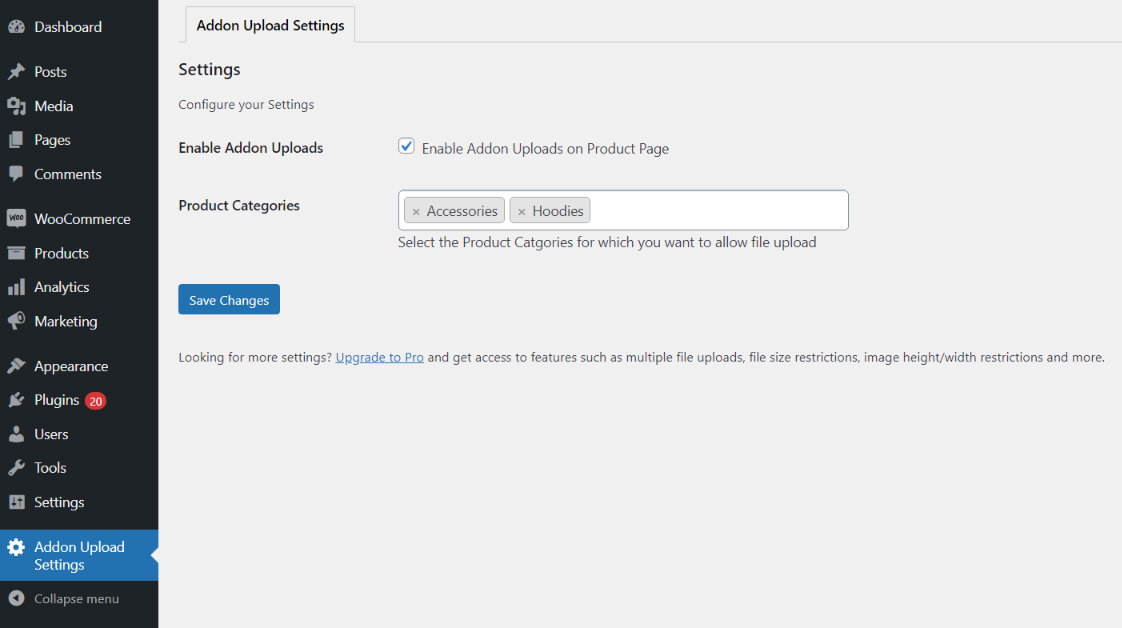
Admin Settings 
Front end view with Uploader 
Thumbnail in Cart 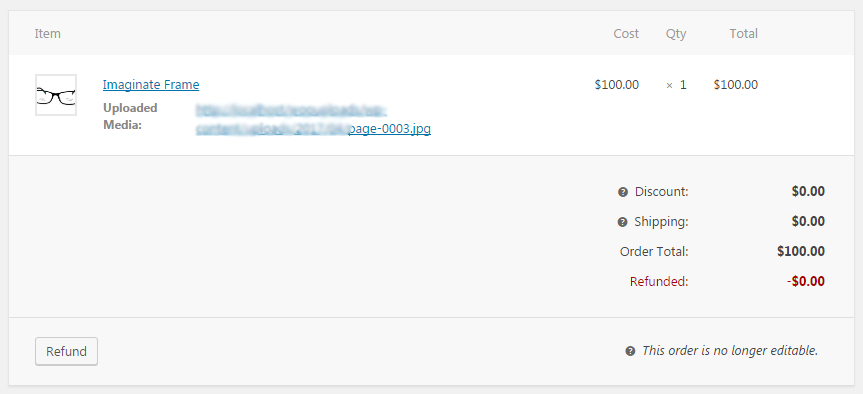
Link of media once order received
Installation
Automatic Installation
Automatic installation is the easiest option as WordPress handles the file transfers itself and you don t need to leave your web browser. To do an automatic install of File Uploads Addon for WooCommerce, log in to your WordPress dashboard, navigate to the Plugins menu and click Add New.
In the search field type “File Uploads Addon for WooCommerce” and click Search Plugins. Once you’ve found our plugin you can view details about it such as the the point release, rating and description. Most importantly of course, you can install it by simply clicking “Install Now”.
Manual installation
The manual installation method involves downloading our eCommerce plugin and uploading it to your webserver via your favourite FTP application. The WordPress codex contains instructions on how to do this here.
FAQ
-
Does this work with the WooCommerce Cart and Checkout blocks?
-
Yes. File Uploads Addon is fully compatible with the modern WooCommerce Cart and Checkout block experience introduced in WooCommerce 7+.
-
Is this compatible with WooCommerce HPOS?
-
Yes, the plugin is fully compatible with WooCommerce High-Performance Order Storage (HPOS).
-
Can I enable file uploads for only certain products?
-
The free version supports category-level control (from WooCommerce Settings) and also supports a developer filter to restrict uploads to specific product IDs:
add_filter( 'wau_include_product_ids', 'wau_include_only_product', 10, 1 );

function wau_include_only_product( $pids ) {
    return array( 310, 315 ); // Add your product IDs here
}
For a no-code per-product toggle, upgrade to the Pro version.
-
Can customers upload multiple files?
-
Multiple file uploads are available in the Pro version.
-
Where can I view uploaded files as an admin?
-
Uploaded files appear directly on the WooCommerce order details screen. In the Pro version, files are also sent as email attachments with the new order notification.
-
What file types are supported?
-
The plugin supports image file uploads. For broader file type support or file size/resolution controls, see the Pro version.
-
Is this compatible with PHP 8.2?
-
Yes, full compatibility with PHP 8.2 was added in version 1.7.0.
Reviews


Contributors & Developers
“File Uploads Addon for WooCommerce” is open source software. The following people have contributed to this plugin.
Contributors

“File Uploads Addon for WooCommerce” has been translated into 6 locales. Thank you to the translators for their contributions.
Translate “File Uploads Addon for WooCommerce” into your language.
Interested in development?
Browse the code, check out the SVN repository, or subscribe to the development log by RSS.
Changelog
1.7.4 (20.03.2026)
- Security fix: Added nonce validation when downloading files from the admin panel.
1.7.3 (20.03.2025)
- Fixed issue related to unauthorized access from admin panel.
1.7.2 (02.03.2025)
- Security Enhancement: Changed the way the uploaded files were handled after being uploaded by end users.
- Some PHPCS fixes.
- Tested upto latest WordPress and WooCommerce versions.
1.7.1 (12.01.2024)
- Added an improvement for compatibility with Product Options and Price Calculation Formulas for WooCommerce
- WooCommerce tested upto 8.4
1.7.0 (26.10.2023)
- Compatibility with PHP 8.2
- Compatibility with WooCommerce HPOS
1.6.1 (04.05.2023)
- Fixed a minor bug related to WooCommerce Cart and Checkout Blocks.
1.6.0 (20.04.2023)
- Added compatibility with WooCommerce Cart and Checkout Blocks.
- WC Tested upto 7.6
1.5.0 (19.07.2022)
- Resolved conflicts when there is Pro version active.
- WC Tested upto 6.7
1.4.2 (18.04.2021)
- Added support for enabling uploads for Product Categories
- WC Tested upto 5.2
1.4.1 (26.03.2021)
- WC Tested upto 5.1
- Plugin name changes
1.4.0 (13.08.2020)
- Fix – issue where file was getting uploaded to other products as well where the user had not uploaded any file.
- Dev – Added filter to allow only specific products where files can be uploaded.
- Dev – Added compatibility with WooCommerce 4.3
1.3.0 (13.06.2020)
- Dev – Added pot files for translations
- Dev – Added compatibility with WooCommerce 4.2
1.2.0
- Issue fixed related to deprecated item meta hook
1.1.0
- Issue fixed related to Add to cart when media is missing
1.0.0
- Initial Launch Version